




Efficient and secure access to your trading account is the cornerstone of a successful trading experience. Whether you're navigating the Exness login process for the first time or looking to enhance security while accessing the platform, understanding the best practices is essential. Exness offers a variety of login options tailored to meet the needs of traders using platforms like MetaTrader 4 and 5, mobile apps, and the Personal Area. This guide will walk you through everything you need to know to log in quickly and securely, ensuring you can focus on trading with confidence.
Ensuring Security During Exness Login
Protecting your Exness account login is crucial for secure trading. By leveraging tools like Two-Factor Authentication and avoiding phishing, you safeguard access to the Exness personal area and trading platforms such as MetaTrader 4 and 5.
1: Two-Factor Authentication (2FA) Setup
Navigate to the Exness Personal Area and log in using your credentials.
Access the Security Settings section under your account dashboard.
Choose your preferred 2FA method:
SMS verification for secure OTP delivery.
Authenticator apps like Google Authenticator for enhanced protection.
Follow the prompts to activate and verify 2FA on your account.
Always store your backup codes securely in case you lose access to your primary 2FA method.
Enabling 2FA significantly reduces risks associated with unauthorized access, particularly when logging into platforms like Exness MT5 login or mobile trading apps.
2: Recognizing Phishing Attempts
Recognizing phishing is vital for securing your Exness sign-in.
Always access Exness through the official website or app.
Verify the URL starts with https:// and includes “exness.com.”
Avoid links in unsolicited emails claiming to be from Exness, especially those asking for login details.
Be cautious of fake pop-ups or ads mimicking the Exness trading platform.
Common Phishing Indicators Table:
| Indicator | Description | Action |
|---|---|---|
| Mismatched URLs | Links don’t match the official Exness site. | Avoid clicking; report them. |
| Urgent Action Requests | Messages demanding immediate login to fix issues. | Verify directly with Exness. |
| Unusual Sender Address | Email addresses that don’t end in @exness.com. | Block and ignore. |
| Attachments or Links | Files or links claiming to offer account upgrades. | Avoid; Exness never sends files. |
Taking precautions helps protect sensitive data like your Exness account login credentials.
3: Best Practices for Strong Passwords
Use a mix of uppercase, lowercase, numbers, and special characters (e.g., ExN3$$$LoG!n).
Avoid using personal details like names or birthdates.
Regularly change your password, especially after accessing the Exness personal area from public devices.
Use a password manager to securely store and manage credentials.
These practices ensure the security of your Exness trading platform logins, reducing risks from brute-force attacks.
By adopting 2FA, recognizing phishing attempts, and employing strong passwords, you can confidently protect your Exness login and access trading platforms securely.
Troubleshooting Common Login Issues
Struggling to access your Exness account? Whether it’s resetting your Exness password or resolving login errors on MetaTrader 4, this guide covers practical solutions for seamless access to the Exness trading platform.
Forgot Exness Password?
Losing access to your account can be stressful. Here’s how to reset your Exness account login password securely:
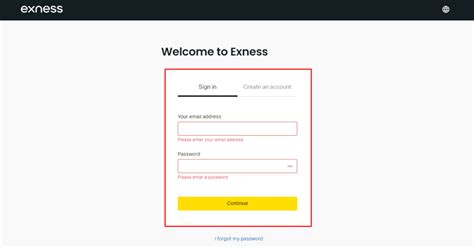
Visit the Exness Personal Area Login Page: Navigate to the official login portal.
Click "Forgot Password": This link redirects you to the recovery process.
Enter Your Registered Email: Provide the email associated with your Exness account.
Check Your Inbox: Look for a password reset email and follow the link provided.
Set a New Secure Password: Ensure it’s strong and unique, combining letters, numbers, and special characters.
Login Again: Use your new credentials to sign in securely.
Why Can't I Access My Exness Account?
There are several reasons why you might face issues:
IP Restrictions: Exness limits access from certain regions. Use a secure VPN to resolve this.
Browser Compatibility Issues: Ensure you’re using updated versions of Chrome, Firefox, or Edge.
Incorrect Credentials: Double-check your Exness mt4 login or mt5 login details.
Account Suspension: Contact customer support if you suspect your account has been flagged.
Resolving Exness Login Errors on MT4/MT5
MetaTrader errors are common but fixable:
| Error | Cause | Solution |
|---|---|---|
| Invalid Account | Incorrect Exness login credentials | Re-enter your login ID and Exness investor password. |
| No Connection | Internet issues or server problems | Check your internet and select the correct server. |
| Authorization Failed | Incorrect password | Reset your Exness mt5 login password. |
| Account Disabled | Account suspension or inactive account status | Contact Exness Live Chat or Email Support. |
Follow these troubleshooting steps for uninterrupted trading on MetaTrader platforms.
Contacting Exness Customer Support for Login Help
If self-help fails, Exness Customer Support offers robust solutions:
Live Chat: Instant resolutions for Exness sign-in errors.
Email Support: Submit a detailed query for complex issues.
Phone Support: Speak to a representative for urgent matters.
FAQ Section: Explore detailed guides on troubleshooting Exness account login problems.
Tip: Prepare your account details before contacting support to expedite the resolution.
Exness Login Across Different Account Types
Exness login processes vary across account types, ensuring tailored accessibility for traders. From Standard Accounts to Islamic Accounts, this guide explores secure and efficient logins while incorporating Exness keywords for optimal functionality.
1. Login for Standard Accounts
Logging into a Standard Account with Exness is straightforward and user-friendly:
Visit the Exness Personal Area: Navigate to the Exness website and click on the "Sign In" button.
Enter Login Credentials: Input your registered email and password securely.
Access the Trading Platforms: After logging in, connect to MetaTrader 4, MetaTrader 5, or the WebTerminal to manage trades.
Enable 2FA for Added Security: Activate two-factor authentication to safeguard your login process.
These steps simplify access for beginner traders while integrating essential Exness account login features.
2. Professional Account Login Requirements
Exness Professional Accounts cater to seasoned traders, offering tailored features. Accessing this account type requires:
Verification of Eligibility: Traders must meet criteria such as significant trading volume or professional certifications.
Secure Login to MetaTrader Platforms: Use the Exness mt4 login or mt5 login credentials for advanced trading.
Increased Security Layers: Professionals should utilize Exness’s advanced account settings for enhanced protection.
Professional Login Requirements Table
| Feature | Professional Accounts Requirements | Notes |
|---|---|---|
| Minimum Equity | $200,000 or equivalent | Eligibility criterion |
| Login Platform Access | MetaTrader 4, MetaTrader 5, cTrader | Advanced trading functionalities |
| Security Measures | Two-Factor Authentication, Secure Tokens | Recommended for high-volume traders |
| Verification Process | Proof of Professional Status | Industry-recognized certifications |
3. Demo Account Login: Practice Trading Securely
A Demo Account allows traders to hone their skills risk-free. Logging in involves:
Registering via Exness Personal Area: Use the "Sign In" option to create or access a demo account.
Accessing the Exness Trading Platform: Test strategies on MetaTrader 4 or MetaTrader 5 with virtual funds.
Switching Between Demo and Live Accounts: Easily toggle between account types for seamless practice and real-time trading.
This process provides a bridge for beginners transitioning to live trading accounts.
4. Logging Into Islamic Accounts
Islamic Accounts cater to traders requiring swap-free features for religious compliance:
Activate Islamic Options: New accounts can select swap-free settings during registration.
Unique Exness Account Login Features: Enjoy trading Forex, Commodities, and Metals without overnight interest charges.
Login Process: Enter your Exness login details, enabling access to MetaTrader 4 or MetaTrader 5 platforms while adhering to Shariah principles.
Islamic account holders benefit from specialized features while maintaining full platform access.
5. Cent Account Login: Managing Micro Trading
The Cent Account simplifies trading for beginners and small-scale investors:
Log In Through WebTerminal: Direct login with minimal credentials required.
Connect to MetaTrader Platforms: Exness mt4 login supports micro-lot trading seamlessly.
Simplified Interface: Cent Accounts emphasize ease of use, suitable for new traders or low-risk experiments.
This account type fosters trading confidence without high financial stakes.
6. Switching Between Account Types in Exness
Managing multiple account types is effortless:
Log Into the Exness Personal Area: Use the "Sign In" feature to access all your registered accounts.
Navigate to the Accounts Section: View all active accounts, including Standard, Professional, and Demo.
Switch With a Click: Select your desired account type, and the system will redirect to the relevant Exness trading platform.
Switching ensures traders can optimize their strategy across different account features.
Each Exness account type enhances the trading experience with tailored login processes and platform features. From Standard Accounts to Islamic Accounts, seamless integration ensures secure and efficient access for all traders. Ready to explore your options? Log in today!
Integrating Exness Login With Payment and Trading Platforms
Seamless integration of Exness login with payment methods and trading platforms enhances user experience, allowing traders to access MetaTrader 5, make secure transactions, and leverage powerful tools like Social Trading efficiently.
1. Linking Payment Methods for Quick Login Access
Efficiently integrating payment methods with the Exness account login ensures faster deposits and withdrawals. Follow these steps to set up secure connections:
Access the Exness Personal Area
Log in to your Exness account and navigate to the payment section.Choose a Payment Method
Select from options like Bank Transfer, Credit/Debit Cards, or Electronic Payment Systems (e.g., Skrill or Neteller).Verify Your Details
Confirm your identity and payment details for enhanced security.Enable Auto-Save for Trusted Devices
Save payment preferences on secure devices for quick future access.
Tip: Always use the same login credentials and payment details to prevent discrepancies.
2. One-Click Trading With Exness Login on MT5
The MetaTrader 5 platform offers a streamlined process for executing trades immediately after logging into Exness. Traders can benefit from features like:
Instant Order Execution: Quick trade placements with minimal delays.
Integrated Risk Management Tools: Access margin, leverage, and spreads directly from the dashboard.
User-Friendly Interface: Simplified navigation for both beginners and experienced traders.
3. Using Exness Login for Social Trading
Social Trading connects Exness sign-in users with a community of experienced traders, enabling copy-trading. Key features include:
Follow and Copy Strategies
Mimic successful traders' actions directly from your account.Customizable Parameters
Set trade limits and preferences to suit your risk appetite.Performance Analytics
Evaluate strategy performance before committing funds.
Table: Comparison of Social Trading Features Across Exness Platforms
| Feature | Desktop App | Mobile App | Web Platform |
|---|---|---|---|
| Copy-Trading Tools | Advanced Analytics | Quick Insights | Standard Features |
| Accessibility | Requires Software | On-the-go Trading | Browser-Based |
| Best Use Case | In-depth Analysis | Quick Trades | Flexible Access |
| Supported Accounts | Professional, Demo | All Account Types | Standard, Islamic |
4. Integrating Exness Login With Payment and Trading Platforms
Integrating Exness login for payments and trading tools creates a cohesive ecosystem. Here’s why this matters:
Simplified Workflow: Move seamlessly from deposit to trading with minimal interruptions.
Enhanced Security: Unified logins reduce vulnerability to breaches.
Time Efficiency: One-step access to platforms like cTrader and payment gateways speeds up operations.
Pro Tip: Use a password manager to streamline secure login processes across connected systems.
By integrating Exness login with payment and trading platforms like MT5 and Social Trading, traders unlock an ecosystem designed for efficiency, security, and performance. Prioritize seamless workflows for a superior trading experience.
Advanced Tips for Exness Login Optimization
Optimizing your Exness login ensures faster access while maintaining security. This guide dives into features like auto-login, multi-account management, and notification setups for efficient, secure trading experiences.
1. Enabling Auto Login Without Compromising Security
Biometric Authentication: Use fingerprint or facial recognition via the Exness mobile trading app for swift and secure login.
Browser-Specific Settings: Enable trusted devices to save login credentials while keeping auto-login disabled on shared systems.
Session Timeout Configurations: Adjust idle session settings in the Exness personal area for convenience without sacrificing safety.
2. Optimizing Exness Login for Mobile Trading
For a seamless mobile trading experience:
Update Regularly: Ensure the Mobile Trading App is up to date for new security and performance features.
One-Tap Access: Use Exness sign in with biometrics for convenience.
Connection Stability: Avoid public Wi-Fi to secure credentials when using the WebTerminal.
Push Notifications: Enable alerts for login attempts to monitor access.
3. Managing Multiple Accounts With a Single Login
Efficient account management ensures streamlined access across account types:
| Feature | Description | Usage Tip |
|---|---|---|
| Account Linking | Manage multiple Exness trading platforms via a unified dashboard. | Access the Exness personal area to link your Standard and Professional accounts. |
| Quick Switch Option | Toggle between accounts using a single Exness login. | Ideal for users handling both a Demo Account and a live Islamic Account simultaneously. |
| Custom Labels | Add labels to differentiate between accounts in the Mobile Trading App. | Label based on trading goals, e.g., "Scalping Forex" or "Long-Term Stocks." |
| Unified Notifications | Get login and account activity alerts for all linked accounts. | Use email notifications for real-time updates on activity across accounts. |
| TradingView Integration | Monitor linked accounts while leveraging analytics from the TradingView platform. | Seamlessly shift from MT4 login to insights-driven decisions on TradingView. |
4. Setting Up Notifications for Login Activity
Monitoring your login activity is crucial for security:
Real-Time Alerts: Enable notifications for all login attempts in your Exness account login settings.
Custom Thresholds: Set alerts for unusual activity, such as logins from unrecognized devices or multiple failed attempts.
Notification Channels: Choose between push notifications, email, or SMS for updates on MetaTrader 5 login attempts.
Conclusion
In conclusion, accessing your Exness account quickly and securely is essential for seamless trading. Whether you’re managing trades on MetaTrader 4 or MetaTrader 5, setting up a Cent Account, or exploring features like Exness Social Trading, understanding the right login options and best practices ensures efficiency and safety. By following the security tips, troubleshooting advice, and optimization techniques outlined in this guide, you’ll confidently navigate your Exness login process. Start implementing these strategies today to unlock a smoother, safer trading experience.
To log into the Exness Personal Area:
Ensure you’re on the official site to avoid phishing risks.
Visit the official Exness website.
Click "Sign In" at the top-right corner.
Enter your registered email address and password.
If you forget your login details:
Remember to create a strong password to prevent unauthorized access.
Go to the login page and click "Forgot Password?"
Enter your registered email address.
Follow the instructions sent to your email to reset your password.
The difference lies in the trading platforms:
Both logins require your trading account ID, password, and server details.
Exness MT4 login: Used for the MetaTrader 4 platform, ideal for beginners with simpler interfaces.
Exness MT5 login: For the MetaTrader 5 platform, offering advanced tools and broader financial instruments.
Yes, with one Exness login, you can manage multiple trading accounts:
This feature is particularly useful for traders with diverse strategies.
Access them through your Exness Personal Area.
Easily switch between accounts without needing separate credentials.
To log into the Exness mobile app:
You’ll have instant access to your accounts and trading platforms.
Download the app from your app store.
Open the app and select "Login."
Enter your email and password registered with Exness.
Here are key ways to secure your login:
Enable Two-Factor Authentication (2FA) for added security.
Avoid sharing your credentials.
Use strong passwords and update them regularly.
Only log in through the official Exness website or apps.
If you’re facing login issues on MetaTrader platforms:
If the issue persists, contact Exness Customer Support.
Verify your account ID, password, and server name are correct.
Ensure a stable internet connection.
Check for platform updates or maintenance.
Exness login provides:
Whether you’re trading Forex, stocks, or cryptocurrencies, Exness login ensures smooth and secure trading experiences.
Access to a wide range of trading platforms, including MetaTrader 4, MetaTrader 5, and the WebTerminal.
Unified account management through the Personal Area.
Seamless integration with Exness trading features like leverage, order execution, and real-time analysis.

