




Logging into your trading account securely is one of the most important steps to ensuring the safety of your investments and personal information. Pepperstone login provides traders with a seamless yet highly secure access to their accounts, but understanding how to protect your login process is essential for a secure trading experience. Whether you're a new user or a seasoned trader, knowing how to properly set up and manage your Pepperstone login can prevent potential security breaches and offer peace of mind.
Account Security Features
In today’s online trading world, securing your Pepperstone login is paramount. As one of the most trusted trading platforms, Pepperstone provides several layers of security to ensure the safety of your account.
1. Two-Factor Authentication (2FA) Setup
Step 1: Log in to your Pepperstone account and go to the account settings.
Step 2: Enable two-factor authentication (2FA) via an authentication app like Google Authenticator.
Step 3: Link the app to your account by scanning the QR code provided on the platform.
Step 4: Enter the verification code from the app to complete the setup.
Two-factor authentication significantly enhances the security of your account by requiring a second layer of authentication beyond just your password. This makes unauthorized access much harder, even if your password is compromised.
2. Password Best Practices
For your Pepperstone login, it’s crucial to create a password that is both strong and secure. Consider the following best practices:
Use a mix of uppercase, lowercase, numbers, and special characters.
Avoid using easily guessable information, such as your name or birthdate.
Use a password manager to store and generate complex passwords.
Change your password regularly and avoid reusing the same password across different platforms.
3. Recognizing Phishing Attacks
Phishing is a common threat to Pepperstone login security. Here’s how you can recognize phishing attempts:
Look out for suspicious emails that claim to be from Pepperstone, asking for your login credentials or financial information.
Verify the sender’s email address and ensure it matches Pepperstone’s official domains.
Never click on links in emails that seem out of place or ask for personal details. Always visit the official website directly.
4. How to Reset Your Password Securely
If you forget your Pepperstone login credentials, follow these steps to securely reset your password:
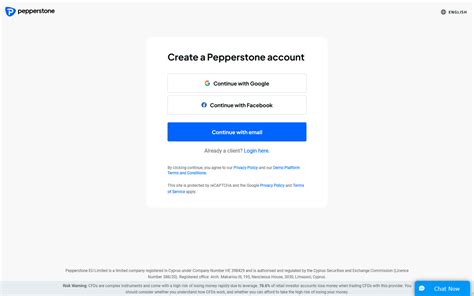
Go to the Pepperstone login page.
Click on the “Forgot Password?” link and enter your registered email address.
Check your inbox for a password reset link and follow the instructions.
Choose a new password and ensure it follows the best practices mentioned above.
By following this process, you ensure that your account is protected from unauthorized access during the reset process.
5. How Pepperstone Ensures Secure Data Transmission
Pepperstone utilizes industry-standard encryption technology, such as SSL certificates, to protect data during login. Here’s a breakdown of how Pepperstone ensures your login credentials and account information stay secure:
| Encryption Technology | Description |
|---|---|
| SSL Encryption | Secures data transmitted between your browser and Pepperstone’s servers, making it unreadable to third parties. |
| Two-Factor Authentication | Adds a second layer of security to protect your account from unauthorized access. |
| Firewalls & Network Security | Protects against unauthorized access to the server and enhances overall system security. |
By using SSL encryption, firewalls, and two-factor authentication, Pepperstone ensures that all sensitive data is securely transmitted during the login process.
With these security features in place, you can feel confident in the safety of your Pepperstone login. Always make sure to follow best practices and take advantage of all available security options to protect your account and personal information.
Accessing Your Pepperstone Account
Accessing your Pepperstone account securely is crucial to maintaining control over your trading platform and financial instruments. Whether using MetaTrader 4, WebTrader, or mobile trading apps, this guide covers the key steps for secure login.
1. Logging in via WebTrader
WebTrader is a popular way to access Pepperstone accounts directly through a web browser. This platform is known for its ease of use and secure login process. Here's how you can log in securely:
Step 1: Open your web browser and navigate to the Pepperstone WebTrader login page.
Step 2: Enter your Pepperstone login credentials, including your username and password.
Step 3: Once logged in, ensure your browser encryption is active (look for "https" in the URL) for a secure session.
For additional protection, enable two-factor authentication on your account to further enhance your login security.
2. Using the MetaTrader 4 (MT4) Platform
MetaTrader 4 is one of the most popular trading platforms among Forex traders. Here’s how you securely log in:
Ensure You Have the Latest Version: Download the latest version of MetaTrader 4 from the Pepperstone website to prevent any vulnerabilities.
Input Your Credentials: Open the MT4 platform, enter your Pepperstone login details (username and password), and select the correct server.
Security Check: Always verify the SSL certificate when prompted, ensuring your account is safe from potential hackers.
3. Mobile Login Process
Logging in via mobile is convenient for traders on the go. However, maintaining security is just as critical on mobile devices as on desktops. Here are the steps for secure login:
Download the Official App: Always download the Pepperstone mobile app from trusted stores like Google Play or the Apple App Store.
Enable Fingerprint or Face ID: For added convenience, use biometric features for quick and secure login.
Use a Strong Password: Create a unique and strong password for your Pepperstone account and avoid using common passwords across multiple platforms.
Two-Factor Authentication (2FA): If you haven’t set up 2FA, enable it on your account to ensure an added layer of protection when logging in on mobile.
Avoid Public Wi-Fi: When accessing your account on mobile, avoid logging in over public Wi-Fi to prevent potential interception by malicious actors.
4. Client Portal Access
The Pepperstone client portal is where you can manage your account details, view statements, and access funding options. Here’s how you securely access the portal:
Step 1: Visit the official Pepperstone client portal login page.
Step 2: Enter your login credentials (username and password).
Step 3: Ensure you’re on a secure, encrypted page (look for "https" in the URL) before entering your credentials.
Step 4: After logging in, review your account settings and enable any additional security features such as two-factor authentication for future logins.
Common Login Issues and Troubleshooting
1. Forgotten Username or Password
Forgetting your login details can be frustrating, but Pepperstone offers straightforward solutions to recover your account access. Here's how you can retrieve or reset your information:
<step 1> Recover Username
Visit the Pepperstone login page and click on the "Forgot Username" option.
Provide the email associated with your account.
You’ll receive your username via email if it’s a valid match.
<step 2> Reset Password
On the login page, click "Forgot Password" and enter your registered email.
Follow the link sent to your email to set a new password. Ensure it meets the security requirements for a stronger account.
2. Login Failures: Causes and Fixes
Login failures can happen for several reasons. The most common causes and solutions are outlined below:
Incorrect Credentials
Double-check the accuracy of your username and password. Pay special attention to capitalization, special characters, and spaces.
Browser Cache Issues
Clear your browser’s cache and cookies. This will help prevent any saved data from interfering with the login process.
Locked Account
After multiple unsuccessful login attempts, your account may be temporarily locked for security reasons. Wait a few minutes before trying again, or contact customer support if the issue persists.
3. Clearing Cache and Cookies for Smooth Login
If you're facing issues accessing your account, it could be due to your browser’s stored data. Follow these steps to clear the cache and cookies for a smoother login process:
| Step | Action | Why It Works |
|---|---|---|
| Step 1 | Open your browser settings and go to Privacy and Security. | Accessing this section lets you manage saved data. |
| Step 2 | Find the "Clear Browsing Data" option and select it. | Ensures old or corrupted data doesn't affect login. |
| Step 3 | Choose to clear cookies and cached images and files. | Eliminates outdated information stored in the browser. |
| Step 4 | Restart the browser and try logging in again. | Refreshing the browser environment can resolve issues. |
This process should eliminate stored data that might prevent a successful login.
4. When Your Account is Locked
If your Pepperstone account becomes locked due to multiple failed login attempts or a security concern, follow these steps to regain access:
Wait for the lockout period to end, typically 30 minutes after several failed login attempts.
If the issue persists, contact Pepperstone customer support through the Help Center or via live chat. They’ll guide you on the next steps to regain access to your account securely.
Troubleshooting login issues on Pepperstone doesn’t have to be overwhelming. With clear steps to resolve common issues like forgotten passwords, account lockouts, or browser problems, you can quickly regain access to your account and resume trading. Always ensure your account security measures are up to date to prevent future complications.

Additional Security Features
we explore advanced security measures to protect your Pepperstone account. These features are essential for safeguarding your login and ensuring safe access to MetaTrader, cTrader, and other trading platforms.
1. Utilizing Account Recovery Options
Account Recovery via Email: If you've forgotten your credentials, you can recover your account by using the registered email address associated with your Pepperstone account.
Phone Number Recovery: For added security, Pepperstone allows you to recover your account through the registered phone number via SMS code or call.
Verification Documents: In some cases, Pepperstone may request official documents to verify your identity during the recovery process.
Customer Support: If standard recovery options fail, Pepperstone’s Customer Support can assist with account recovery through Live Chat or Email.
2. Setting Up Security Questions
When it comes to securing your Pepperstone login, setting up security questions is an excellent additional layer of protection. You may have encountered this process when signing up for various online accounts. The principle behind security questions is simple: if you forget your password, you can answer a pre-set question to regain access.
For instance, imagine you’ve selected a question like, “What was the name of your first pet?” This adds a personalized barrier that strengthens your account security. However, it's important to pick questions and answers that are difficult for others to guess, ensuring they are unique to you and not easily found on social media. Pepperstone offers this option during account setup, allowing users to select from a variety of questions or input custom ones.
Not only does this prevent unauthorized login attempts, but it also reduces the risk of account hacking or phishing attacks.
3. Understanding IP Whitelisting for Added Security
| Feature | Description | Benefits |
|---|---|---|
| What is IP Whitelisting? | IP Whitelisting allows only specific IP addresses to access your Pepperstone account. | Limits access to trusted devices. |
| How It Works | You can configure your account settings to allow logins only from particular IP addresses. | Prevents login from unauthorized locations. |
| How to Enable | Navigate to the account settings in the Client Portal and enter the IPs that you want to whitelist. | Easy to set up through the Pepperstone platform. |
| Security Benefit | By restricting login access to only specific IP addresses, the risk of unauthorized access is minimized. | Enhances security for users who frequently trade from fixed locations. |
IP Whitelisting offers a high level of protection against unauthorized access, especially for those who prefer secure logins from home or their workplace. By enabling this feature, you can ensure that no one can log in to your Pepperstone account unless they are using an approved IP address. This is particularly useful for those who value account security above all else, as it adds another layer to the standard login procedure.
Understanding Pepperstone's Trading Platforms
1. Choosing the Right Trading Platform
Selecting the ideal trading platform is crucial for successful trading. Pepperstone offers multiple platforms catering to different trading styles and preferences, including MetaTrader 4 (MT4), MetaTrader 5 (MT5), cTrader, and WebTrader.
MetaTrader 4 (MT4) is widely used by beginners and seasoned traders alike for its user-friendly interface and robust tools.
MetaTrader 5 (MT5) offers enhanced features such as more timeframes and improved charting tools, ideal for advanced traders.
cTrader is perfect for traders who require a clean interface, fast order execution, and advanced charting.
WebTrader enables traders to access their account from any browser without downloading additional software.
Each platform has its strengths, and choosing the right one will depend on your trading needs, whether you're focused on Forex, CFDs, or Commodities.
2. Why WebTrader is Secure for Trading
WebTrader provides an accessible and secure option for traders who prefer not to install software. It offers a secure login, reliable data protection protocols, and full access to Forex, CFDs, and other instruments. Since it’s web-based, there are fewer concerns regarding software vulnerabilities.
3. MetaTrader 5 Login Process
To log into MetaTrader 5, follow these steps:
Download the MT5 platform and install it on your device.
Open the app and click on "File" and then "Login to Trade Account."
Enter your Pepperstone account number, password, and select the server that corresponds to your account type (e.g., Razor Account).
Click "Login" to access your account.
MT5 offers a better user experience with advanced charting tools, ideal for traders looking to diversify their strategies.
4. Mobile Trading Security Tips
Mobile trading provides flexibility and access to the markets on the go. However, security should be a top priority. Here are some tips for ensuring your mobile trading experience is safe:
Enable Two-Factor Authentication (2FA) to add an extra layer of security.
Avoid public Wi-Fi when logging into your Pepperstone account; always use a private network.
Use strong passwords and change them regularly.
Ensure your mobile trading app is always up-to-date to benefit from the latest security patches.
5. How to Enable Safe Logins on cTrader
cTrader offers several security features, including secure login options for added protection:
Ensure your account is protected by Two-Factor Authentication (2FA).
Use a secure internet connection when logging in to avoid interception.
Regularly update your app to prevent security vulnerabilities.
By following these steps, you can trade confidently on cTrader with your Pepperstone account.
6. Managing Multiple Trading Platforms Securely
Some traders prefer to use multiple platforms to trade different instruments. To manage multiple accounts securely, follow these guidelines:
Separate your login credentials for each platform.
Use a password manager to securely store credentials.
Regularly update passwords and enable 2FA.
For advanced traders using Forex, Cryptocurrencies, and Shares, each platform offers different tools tailored to these instruments.
Customer Support and Assistance
Customer support is crucial when it comes to ensuring a seamless and secure experience for Pepperstone users. Whether you encounter login issues, have account-related questions, or need assistance with technical problems, Pepperstone offers various channels of support. Let’s explore how to access these services effectively, ensuring a smooth trading experience.
1. How to Contact Pepperstone Support for Login Issues
Format: List Format (Bullet Points)
If you’re having trouble logging into your Pepperstone account, there are several ways to get in touch with their support team:
Live Chat: Accessible directly on the Pepperstone website, the live chat feature connects you with a support representative in real-time.
Email: Send an email to the support team detailing your login issue, and they will respond within 24 hours.
Phone Support: If you prefer direct communication, you can call the customer service number provided on the website for immediate assistance.
Help Center: Visit the Pepperstone Help Center for comprehensive FAQs and guides that can help resolve login problems.
2. Accessing Pepperstone’s FAQ Section
Pepperstone’s FAQ section is a treasure trove of solutions for various issues, including login problems. It covers the most common challenges traders face when trying to access their accounts. From troubleshooting common errors to understanding Pepperstone’s login security features, the FAQ provides quick, self-service support.
The FAQ section categorizes topics based on different aspects of account management, trading platforms, and security. This is a great starting point for anyone experiencing difficulty with their login credentials, as it offers step-by-step troubleshooting guides. For example, if you're unable to access your Pepperstone account due to a password issue, the FAQ section will walk you through resetting your password securely or addressing any errors that may be causing the problem.
3. Using Live Chat for Immediate Assistance
For urgent login issues, Pepperstone’s Live Chat provides instant support. Below is an infographic summarizing the benefits and how to access live chat effectively:
| Benefit | Details |
|---|---|
| Instant Response | Get connected to a representative immediately. |
| 24/7 Availability | Available at any time, regardless of market hours. |
| Easy to Use | Click the chat icon on the website to start. |
| Helpful for Account Issues | Quick resolution for login, password, and account access. |
By using the live chat service, you can directly discuss your login issues with a support agent, who will guide you through the process. This real-time support makes it easy to get back into your trading account without delay.
we’ve covered how to reach Pepperstone’s customer support for any login issues, including the importance of the FAQ section and live chat for immediate assistance. These resources ensure that if you encounter login problems, there is always a solution readily available to help you get back to your trading without unnecessary interruptions.
Conclusion
In conclusion, securely logging into your Pepperstone account is crucial to safeguarding your financial investments and personal information. By understanding and implementing the key security features discussed in this guide, you can ensure that your trading experience remains both safe and seamless. Whether you're using Pepperstone's MetaTrader 4, MetaTrader 5, cTrader, or WebTrader platforms, the steps outlined will help you avoid common login issues, maintain secure access, and troubleshoot effectively if needed.
With the added layers of two-factor authentication (2FA), password management, and the availability of Pepperstone's customer support, you can feel confident knowing that your account is protected by industry-leading security standards. We also highlighted the importance of staying vigilant against common threats like phishing attacks, and how to recover your account if something goes wrong.
Remember, whether you are a novice or an experienced trader, the security of your account should always be a top priority. By following the guidance in this pillar content, you'll be well-prepared to log in to Pepperstone securely and enjoy a smooth trading experience.
Enabling 2FA on your Pepperstone account enhances security by requiring a second verification step during login. To set it up:
Go to your account settings in the client portal.
Select the Security section and choose Two-Factor Authentication.
Follow the on-screen instructions to link your account with an authentication app (like Google Authenticator).
If you've forgotten your password, you can easily reset it by following these steps:
Click on the Forgot Password link on the login page.
Enter your registered email address and follow the instructions sent to your inbox.
Reset your password and choose a secure new one to regain access.
Yes, you can use MetaTrader 4 (MT4) to securely log in to your Pepperstone account. Simply:
Download and install MT4 from the Pepperstone website.
Open the app, select Login, and enter your Pepperstone account number and password.
The most common login issues with Pepperstone are:
To fix these, try clearing your browser cache or contact customer support if necessary.
Incorrect password or username.
Browser cache or cookies causing conflicts.
IP restrictions or multiple failed login attempts resulting in a locked account.
Pepperstone’s login process is highly secure, featuring:
Two-Factor Authentication (2FA) for an extra layer of security.
Encryption to protect sensitive data.
Constant updates to ensure compliance with industry security standards.
Yes, you can log in securely via the Pepperstone mobile app:
Open the app on your phone and enter your account credentials.
If you’ve enabled 2FA, use the verification code from your authentication app to complete the login process.
If you suspect your account has been compromised, follow these steps immediately:
Change your password and enable 2FA.
Contact Pepperstone customer support to report the issue.
Review your recent transactions to check for any suspicious activity.
If you experience any login issues, you can reach Pepperstone customer support through:
Live chat for immediate assistance.
Email or phone support, available through the Help Center on the website.

