




Logging into your ThinkMarkets account is the first step toward accessing a world of trading opportunities, but ensuring a secure login process is equally important. Whether you’re a seasoned trader or just starting, understanding how to log in to ThinkMarkets securely can protect your account and keep your investments safe. In this guide, we’ll explore everything from the basic login steps to advanced security features like two-factor authentication, helping you confidently access your trading platform across devices. By the end, you’ll have all the tools you need to make your ThinkMarkets login experience both seamless and secure.
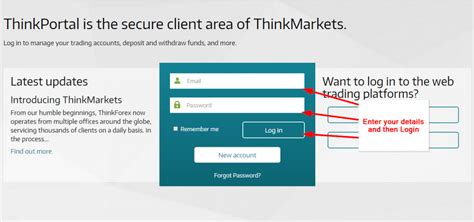
Step-by-Step Guide to ThinkMarkets Login
Mastering secure ThinkMarkets login ensures seamless access to this leading trading platform.
1. Accessing the ThinkMarkets Login Page
To get started, follow these steps to access the ThinkMarkets login page securely:
Open your browser and visit the official ThinkMarkets website.
Look for the Login page link on the top-right of the homepage.
For mobile users, download the ThinkMarkets app from the official app store to ensure authenticity.
Avoid using search engines to directly access login links, as phishing sites can mimic official pages.
2. Entering Your Login Credentials
A seamless login process begins with entering accurate credentials:
Use your Username or registered Email address.
Ensure your Password is typed correctly, observing case sensitivity.
If using a mobile app, biometric options like fingerprint scanning can simplify login while maintaining security.
| Credential Type | Purpose | Tips for Accuracy |
|---|---|---|
| Username/Email | Identifies your account | Ensure no typos; double-check spelling. |
| Password | Secures account access | Avoid sharing or storing passwords insecurely. |
| Two-Factor Authentication | Adds an extra security layer | Use authenticator apps for higher protection. |
3. Recovering Forgotten Passwords
If you’ve forgotten your password, ThinkMarkets offers a simple recovery process:
On the Login page, click “Forgot Password.”
Enter your registered email address and submit the form.
Check your inbox for a password reset email; ensure it’s from an official ThinkMarkets address.
Follow the link provided to reset your password. Use a combination of letters, numbers, and symbols for added security.
4. Login Through Mobile App
Logging into ThinkMarkets via the mobile app is quick and user-friendly:
Open the app and navigate to the sign-in screen.
Enter your credentials (email/username and password).
Use built-in security features like biometric authentication for added safety.
Always ensure your app is updated to the latest version to avoid vulnerabilities.
5. Troubleshooting Login Errors
If you encounter login issues, consider these solutions:
Forgot credentials? Use the recovery options to retrieve your username or password.
Browser issues? Clear your cache and cookies or try a different browser.
Authentication failure? Ensure your 2FA codes are correct and synced if using an authenticator app.
Locked account? Contact ThinkMarkets support through the help center for account reactivation.
Following these steps ensures your ThinkMarkets login process is seamless and secure. Remember, keeping your credentials and devices secure is key to protecting your trading journey. Stay proactive, and reach out to support if needed.
Enhancing Security for ThinkMarkets Login
Securing your ThinkMarkets Login is essential for protecting trading accounts and sensitive credentials.
1. Setting Strong Passwords
A secure password is your first defense against unauthorized access to your ThinkMarkets account. Follow these steps:
Use Complexity: Include uppercase, lowercase, numbers, and symbols.
Avoid Common Terms: Steer clear of birthdays, names, or simple sequences like "12345."
Keep It Long: Opt for at least 12 characters.
Regular Updates: Change your password every 3–6 months.
Bonus Tip: Use a reliable password manager to store and generate strong passwords.
2. Enabling Two-Factor Authentication (2FA)
Adding Two-Factor Authentication enhances account security by requiring a secondary verification method.
Benefits of 2FA for ThinkMarkets Users:
| Feature | Description | Example Applications |
|---|---|---|
| Additional Security Layer | Protects your account beyond username and password. | SMS codes, app-generated tokens. |
| Real-Time Alerts | Notifies users of login attempts. | Detect unauthorized attempts immediately. |
| Device-Specific Options | Customizable authentication methods for each device. | Mobile app for frequent traders, SMS for others. |
How to Enable: Log in to the ThinkMarkets interface, navigate to "Account Settings," and activate 2FA. Choose a preferred method, such as Google Authenticator or SMS codes.
3. Recognizing Phishing Attempts
Phishing attacks target account credentials through fake ThinkMarkets login pages. Protect yourself by:
Inspecting URLs: Always verify the URL matches the official ThinkMarkets web portal or mobile app.
Avoiding Email Links: Type the URL directly instead of clicking links in unsolicited emails.
Spotting Suspicious Formats: Phishing emails often have spelling errors, urgent language, or unrealistic offers.
Remember, ThinkMarkets will never ask for your password via email or phone.
4. Understanding Encryption on ThinkMarkets
Encryption is the backbone of secure online platforms like ThinkMarkets. It ensures your login credentials, such as username and password, remain safe during transmission.
ThinkMarkets employs SSL encryption, marked by the padlock symbol in the browser bar. This guarantees:
Secure Communication: Prevents interception of login details.
End-to-End Protection: Ensures data remains confidential from user interface to server.
Peace of Mind for Users: Assures traders and investors that their account credentials are protected.
By understanding and trusting ThinkMarkets’ encryption practices, users can confidently access their trading platform.
Strengthening the security of your ThinkMarkets Login involves a combination of strong password practices, enabling 2FA, staying vigilant against phishing, and understanding encryption. By adopting these measures, traders, investors, and users can protect their accounts and trade securely on the ThinkMarkets platform.
Navigating ThinkMarkets Login Features Across Devices
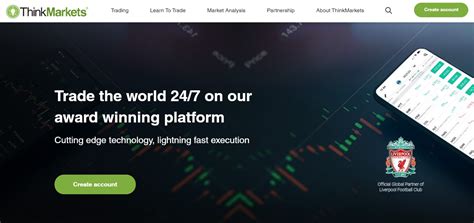
ThinkMarkets provides traders and investors with seamless access across devices.
1. Logging In via Desktop Platform
Desktop access to ThinkMarkets offers a user-friendly interface tailored for investors managing complex portfolios. Key features include:
A highly secure Login page with encryption protocols ensuring data protection.
Compatibility with multiple web browsers like Chrome, Firefox, and Edge.
Features such as saved passwords (with caution) to streamline the login process.
Steps for login:
Navigate to the official ThinkMarkets website and locate the “Login” button.
Enter your username and password in the respective fields.
Complete any additional authentication required, such as CAPTCHA or two-factor verification.
Access your trading dashboard securely.
2. Using ThinkMarkets’ Mobile App for Secure Login
The ThinkMarkets mobile app combines portability with robust account security, providing seamless access for users on the go.
Key features include:
Support for biometric authentication (fingerprint and facial recognition).
Quick login options while ensuring data encryption on all mobile transactions.
Push notifications to alert users about suspicious login activity.
Comparison of ThinkMarkets Login Features on Desktop vs. Mobile
| Feature | Desktop | Mobile App |
|---|---|---|
| Biometric Authentication | Not available | Supported |
| Device Synchronization | Limited to browser login | Fully supported |
| Login Speed | Moderate | Faster with one-tap features |
| Security Features | CAPTCHA, encryption | Biometric, encryption, alerts |
| User Experience | Optimized for analysis | Optimized for trading on-the-go |
3. Browser Settings for Optimal Login Security
Enhancing login security through your browser settings ensures safe access to ThinkMarkets’ online trading platform:
Enable privacy-enhancing extensions, such as ad blockers or anti-phishing tools.
Clear cookies and cache regularly to prevent unauthorized access.
Avoid saving login credentials on shared or public computers.
These steps safeguard sensitive username and password details from potential threats.
4. Multi-Device Login Synchronization
Efficiently managing ThinkMarkets access across devices enhances usability while maintaining account security:
Synchronize your ThinkMarkets account via cloud settings, ensuring seamless transitions between desktop and mobile logins.
Regularly monitor active sessions and terminate any suspicious or outdated sessions to prevent unauthorized access.
Use unique security credentials for each device to minimize risk in case of a breach.
5. Offline Access and Cached Credentials
Offline access might occasionally be required, but it carries potential risks:
Cached credentials can enable unauthorized access if devices are lost or compromised.
Always disable automatic logins on ThinkMarkets, especially on shared devices.
Enable password protection at the device level to act as an additional security barrier.
6. Logging Out Securely
Ending a session securely ensures your ThinkMarkets account remains protected:
Always log out manually, especially when accessing ThinkMarkets on public or shared devices.
Use the Logout option on the ThinkMarkets web portal or mobile app, rather than closing the browser/app directly.
Regularly review recent login activity to spot unusual behavior.
ThinkMarkets’ multi-device login features ensure traders and investors can access their accounts securely while enjoying flexibility. By following these tips, users can enhance their trading experience while safeguarding sensitive data.
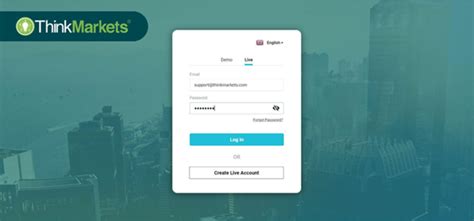
Account Recovery and Advanced Troubleshooting
Managing login challenges on ThinkMarkets is critical for maintaining secure access.
1. Resetting Login Credentials Safely
ThinkMarkets provides several secure methods to reset forgotten login credentials. Follow these steps to ensure your account remains protected during the recovery process:
Initiate Password Reset on the Login Page:
Go to the official ThinkMarkets login page.
Click on the “Forgot Password” link.
Verify Your Identity:
Enter your registered email or account number for verification.
Complete any Two-Factor Authentication (2FA) prompts.
Create a Strong New Password:
Use at least 12 characters, mixing uppercase, lowercase, numbers, and symbols.
Avoid reusing old passwords for enhanced account security.
2. Dealing with Suspicious Login Activity
Stay vigilant to protect your ThinkMarkets account from unauthorized access. Signs of suspicious activity include:
Unexpected login attempts from unknown locations.
Notifications of failed login attempts.
Changes to account settings you didn’t make.
What to do:
Check Login History: Use the account dashboard to monitor login activity.
Update Password Immediately: If you suspect unauthorized access, reset your password.
Enable 2FA: Add an extra layer of protection to your account.
Contact Support: Report suspicious activity to ThinkMarkets for further investigation.
3. Contacting ThinkMarkets Support for Login Issues
ThinkMarkets offers robust support options for troubleshooting login problems. Below is a breakdown of their available support channels:
| Support Option | Features | Response Time |
|---|---|---|
| Live Chat | Instant assistance via the ThinkMarkets web portal or mobile app. | Immediate |
| Email Support | Detailed assistance for account-related queries, including login issues. | 24-48 hours |
| Phone Support | Directly speak with support for urgent problems. | Immediate to 1 hour |
| FAQ and Help Center | Self-service resources for common login and account management queries. | Instant |
Tips for Effective Communication:
Provide your account number or registered email for faster assistance.
Clearly describe the issue, including any error messages received.
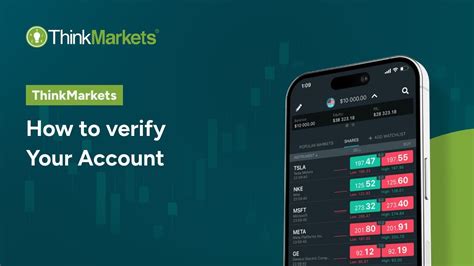
Leveraging Advanced Login Features on ThinkMarkets
ThinkMarkets offers advanced login features, providing traders and investors enhanced security and convenience. This guide explores tools like biometric authentication, session management, and personalized login settings to optimize your experience.
1. Using Biometric Authentication
Biometric authentication enhances security by using unique biological data, such as fingerprints or facial recognition. ThinkMarkets supports these technologies to streamline access and protect login credentials.
Fingerprint authentication: Ideal for mobile app users, allowing quick and secure entry.
Facial recognition: Convenient for traders using compatible devices.
Setup tips: Enable biometrics through the ThinkMarkets app settings for seamless integration.
This feature minimizes password dependency, reducing risks like phishing or weak credentials.
2. Single Sign-On (SSO) Compatibility
Single Sign-On (SSO) simplifies access by enabling users to authenticate with one set of credentials across multiple platforms.
Benefits of SSO on ThinkMarkets:
Time Efficiency: Streamlines login across trading tools and platforms.
Improved Security: Centralized credential management enhances security.
Reduced Credential Fatigue: Limits the need to remember multiple passwords.
| SSO Providers | Key Features | Recommended Use Case |
|---|---|---|
| Wide compatibility, strong encryption | Personal ThinkMarkets accounts | |
| Microsoft Azure | Enterprise-grade security for business users | Institutional traders and corporate clients |
| Auth0 | Customizable authentication solutions | Developers integrating ThinkMarkets APIs |
To enable SSO, visit ThinkMarkets' login page, navigate to “Account Settings,” and select your preferred provider.
3. Session Management Tools
Advanced session management tools empower users to monitor and control their active sessions across devices.
Steps to manage sessions securely:
Log in to your ThinkMarkets account via the web portal or mobile app.
Access “Active Sessions” under account security settings.
Review details such as device, IP address, and session duration.
Terminate unauthorized or unused sessions to maintain security.
These tools ensure account holders retain control, especially when using public or shared devices.
4. Offline Access and Cached Credentials
Offline access allows traders to view cached data without an active internet connection. However, cached credentials can pose risks if not managed correctly.
Key points for ThinkMarkets users:
Enable offline mode cautiously: Configure app settings for secure offline access.
Secure cached credentials: Use device-level encryption to protect sensitive login details.
Monitor data access: Regularly review app permissions and clear cache if necessary.
By balancing convenience with security, this feature ensures seamless trading experiences during connectivity issues.
5. Customizing Login Preferences
ThinkMarkets allows users to personalize their login experience for optimal efficiency and security.
Customizable options include:
Setting login preferences (e.g., auto-login, 2FA prompts).
Adjusting security protocols to align with trading frequency.
Enabling notifications for account access attempts.
Benefits:
Enhanced control over the login process.
Tailored authentication settings for different devices.
Improved transparency in monitoring account activity.
To customize these features, navigate to your ThinkMarkets account dashboard and select “Preferences.”
By leveraging advanced login features on ThinkMarkets, users can enhance both convenience and security. Tools like biometric authentication, SSO, and session management ensure a seamless and protected trading experience, empowering traders to focus on their financial goals.
Conclusion
In today’s fast-paced trading environment, securing your ThinkMarkets login is not just a necessity—it’s a foundational step toward protecting your investments and ensuring a seamless trading experience. By following the step-by-step guidance in this pillar, enhancing your security measures with best practices like two-factor authentication, and leveraging advanced login features, you can confidently access your ThinkMarkets account on any device. Whether you’re troubleshooting login issues, recovering credentials, or customizing your preferences, this comprehensive guide ensures you’re equipped to manage every aspect of your login process securely and efficiently.
Remember, your account’s security is your first line of defense against cyber threats. Apply these strategies, stay vigilant, and maximize your trading potential with peace of mind. For further clarification, check out the FAQs below to address common questions about the ThinkMarkets login process.
If you forget your username or password, you can recover them through the ThinkMarkets login page:
Click on “Forgot Password” and follow the prompts.
Enter your registered email address to receive a password reset link.
If you’ve forgotten your username, contact ThinkMarkets support for assistance.
To enhance security:
Use a strong, unique password with a mix of letters, numbers, and symbols.
Enable two-factor authentication (2FA) for an additional layer of security.
Avoid saving your credentials in browsers or sharing them with anyone.
Yes, biometric authentication, such as fingerprint or facial recognition, is a highly secure method for accessing your ThinkMarkets account. These features are encrypted and difficult to replicate, offering a convenient and secure login alternative.
Yes, your ThinkMarkets username and password are the same across all platforms, including the website, mobile app, and trading terminals. Ensure that your credentials remain confidential regardless of the platform you use.
This could be due to several reasons:
To resolve this:
Double-check your credentials.
Reset your password if needed.
Clear your browser/app cache and try again.
Incorrect username or password.
Your account may be locked due to multiple failed login attempts.
Browser or app cache issues causing a conflict.
Network connectivity problems or server maintenance.
Two-factor authentication (2FA) is an additional layer of security that requires a second form of verification (e.g., a code sent to your mobile device) to complete the login process. To enable 2FA:
Log into your ThinkMarkets account.
Navigate to the Security Settings.
Activate 2FA and follow the on-screen instructions to link your device.
No, ThinkMarkets does not support multiple simultaneous logins for a single account. This policy helps protect your account and ensures that login sessions are secure. If you suspect unauthorized access, contact ThinkMarkets support immediately.
To ensure you’re accessing the official ThinkMarkets login page:
Type the URL manually into your browser (www.thinkmarkets.com).
Avoid clicking on suspicious links in emails or messages.
Look for the HTTPS padlock icon in the browser’s address bar to confirm the site is secure.

