




Accessing your XM (xm.com) account securely and efficiently is the first step to unlocking a world of trading opportunities. Whether you’re managing Forex trades, analyzing CFDs, or exploring other financial instruments, the XM (xm.com) login process is designed to be both fast and user-friendly. In this guide, we’ll walk you through everything you need to know about logging into your account, from essential steps to advanced security measures. By ensuring a seamless login experience, you can focus on what truly matters—strategizing and executing your trades with confidence.
XM (xm.com) Login Essentials
Discover the fundamental steps for secure and efficient access to your XM (xm.com) account, ensuring smooth trading operations across platforms like MT4 and WebTrader.
1: Understanding the XM (xm.com) Login Page
Navigating the XM login page is the first step in accessing your trading account. Follow these simple steps:
Open the official XM (xm.com) website or mobile app.
Locate the "Login" button at the top-right corner of the homepage.
Enter your registered email address and password in the designated fields.
Click "Sign In" to access your account dashboard.
Tips for easy navigation:
Bookmark the official login page to avoid phishing websites.
Ensure that your browser and app are updated for optimal performance.
2: Creating a New XM Account
Opening an account on XM is a straightforward process:
Visit XM (xm.com) and click "Open an Account" on the homepage.
Complete the online registration form with accurate personal details.
Choose your account type (e.g., Standard, Micro, or XM Ultra Low) and preferred trading platform (MT4 or MT5).
Submit your ID for verification to activate your account.
3: Recovering Forgotten Passwords
Losing access to your XM account can be stressful, but recovering your password is simple:
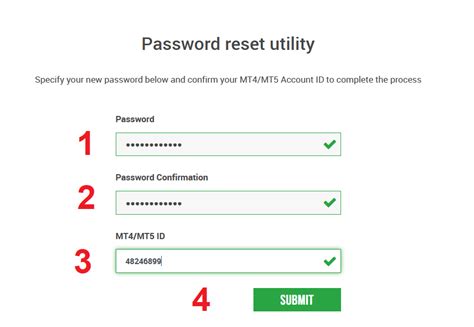
Step 1: On the XM login page, click "Forgot your password?".
Step 2: Enter your registered email address and complete the captcha verification.
Step 3: Check your email inbox for a reset link.
Step 4: Click the link and follow the instructions to create a new password.
Common Reasons for Password Issues:
| Issue | Explanation | Solution |
|--------------------------|--------------------------------------------------|-----------------------------------------------|
| Forgotten Password | User no longer remembers the password. | Use the "Forgot your password?" link. |
| Expired Password Reset Link | The reset link has expired. | Request a new link through the login page. |
| Wrong Password Attempts | Repeatedly entering an incorrect password. | Double-check credentials or reset the password. |
4: Two-Factor Authentication (2FA) at XM
XM offers Two-Factor Authentication (2FA) to enhance account security. Here’s how to enable it:
Log in to your XM account and go to Settings.
Select the Security tab and click on Enable 2FA.
Download a trusted authentication app, such as Google Authenticator.
Scan the QR code displayed on your XM account page with the app.
Enter the generated code to activate 2FA.
Benefits of 2FA:
Protects against unauthorized access.
Provides an extra layer of security during transactions.
5: Common Login Issues and Solutions
Here are some frequent login challenges and their solutions:
Issue: Account locked due to multiple incorrect attempts.
Solution: Wait 15 minutes and retry or contact XM Support.
Issue: Login page not loading.
Solution: Clear browser cache or switch to a different browser.
Issue: Incorrect email or password.
Solution: Verify your login credentials and reset your password if necessary.
For persistent issues, reach out to XM Live Chat or consult the FAQ section on the website.
Secure Login Practices and Account Protection
Secure login practices ensure XM (xm.com) account protection, safeguarding your access to Forex, CFDs, and trading platforms like MT4 and WebTrader. Implement robust strategies to avoid unauthorized access and maintain smooth financial operations.
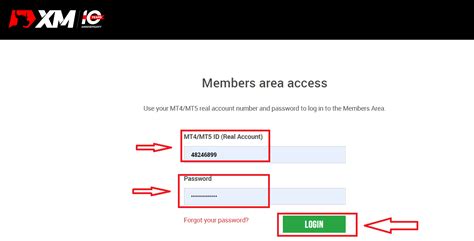
Best Practices for Creating Strong Passwords
Use a combination of uppercase letters, lowercase letters, numbers, and special characters.
Avoid using easily guessed information like your name or birthdate.
Update your password regularly, at least every three months.
Enable XM’s security alerts to track suspicious account activity.
Use a password manager for efficient management and secure storage.
Recognizing Phishing and Fraudulent Login Pages
Phishing attacks target users through fake login pages or deceptive emails. Here's how to stay safe:
Always check the official URL (https://www.xm.com).
Avoid clicking links from unsolicited emails claiming to be from XM.
Look for HTTPS encryption and the padlock symbol in the browser.
Report suspicious activities to XM’s Support team via email or Live Chat.
Red Flags for Phishing Pages
| Red Flag | Description | Action to Take |
|---|---|---|
| Misspelled domain names | Fake domains like “xm-login.net” | Close the page and report to XM’s support team. |
| No HTTPS encryption | Lack of a secure connection (no padlock symbol) | Avoid entering personal information. |
| Requests for unusual data | Asking for personal bank details during login | Exit the page immediately. |
| Suspicious email links | Emails with urgent requests to log in through unfamiliar links | Verify with official XM channels. |
Account Verification Process at XM
The XM account verification process ensures that only authorized users access their accounts. Follow these steps:
Step 1: Log in to your XM account dashboard.
Step 2: Upload identity verification documents (passport, national ID, or driver’s license).
Step 3: Provide proof of residence, such as a utility bill or bank statement.
Step 4: Wait for verification confirmation, typically within 24 hours.
This process reinforces secure login while complying with regulatory requirements.
By implementing strong passwords, recognizing phishing threats, and completing account verification, XM users can protect their accounts and trade securely. Enhanced security ensures smooth login experiences, safeguarding your trading activities and financial transactions.
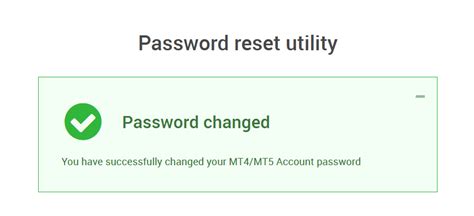
Login Across XM Trading Platforms
Accessing XM trading platforms like MT4, MT5, and WebTrader ensures seamless trading experiences across Forex, CFDs, and other financial instruments. Discover how to log in efficiently and securely on all devices.
Logging into MT4 and MT5 Platforms
Accessing XM’s MT4 and MT5 platforms is straightforward, offering users a smooth way to manage their accounts, execute trades, and analyze financial instruments like Forex, Indices, and Metals. Here’s how to log in step-by-step:
Download and Install:
Install MT4/MT5 from XM’s website or app store.
Choose the version tailored to your device (desktop or mobile).
Enter Login Details:
Use the login credentials provided during account registration.
Select the relevant XM server (e.g., XMGlobal or XMUK).
Access Your Dashboard:
Customize settings, including charts and indicators, for real-time trading.
Begin trading Forex, CFDs, and other instruments securely.
Accessing XM via WebTrader
Logging in through WebTrader is ideal for users who prefer browser-based access without downloading software.
Navigate to the XM WebTrader Login Page.
Enter your account credentials and select the trading server.
Enjoy trading tools like live charts and technical indicators directly in your browser.
Mobile App Login for XM
XM’s mobile app offers secure and convenient access to trading platforms. The app supports financial instruments such as Cryptocurrencies, Commodities, and Energies.
Features of XM Mobile App Login:
| Feature | Description |
|---|---|
| Fast Biometric Login | Use Face ID or Fingerprint for quick access while ensuring account security. |
| Push Notifications | Stay updated with market news, account activities, and trading alerts. |
| On-the-Go Trading | Execute trades and monitor positions anytime, anywhere. |
| Integrated Tools | Access advanced trading tools, charts, and indicators optimized for mobile devices. |
| Compatibility | Available for both iOS and Android, ensuring seamless user experience across devices. |
Platform-Specific Login Settings
Each trading platform—MT4, MT5, or WebTrader—has unique login settings designed to enhance user experience and security:
Server Selection: Always verify the correct server during login.
Customizable Preferences:
Save login details for faster future access.
Enable 2FA (Two-Factor Authentication) for added security.
Multiple Account Management: Switch between trading accounts without logging out.
These customizable settings provide flexibility and efficiency for XM users.
XM ensures secure and seamless access to all its trading platforms, catering to both beginners and seasoned traders. Whether logging into MT4, MT5, or WebTrader, XM users benefit from advanced security, versatility, and the ability to trade financial instruments anytime, anywhere.
Customer Support for Login Issues
XM (xm.com) provides robust customer support solutions for login issues, ensuring secure access to accounts and trading platforms like MT4 and WebTrader. Users can rely on a mix of self-help and live assistance for troubleshooting.
Using the XM Help Center
The XM Help Center is a comprehensive resource for resolving common login issues. It offers detailed FAQs, troubleshooting guides, and instant access to support tickets.
| Help Center Feature | Description | Benefit |
|---|---|---|
| FAQs | Covers questions on account access, password recovery, and two-factor authentication (2FA). | Quick, self-service answers. |
| Troubleshooting Guides | Step-by-step solutions for resolving login errors like "invalid credentials." | Saves time and effort for users. |
| Support Ticket Submission | Enables users to contact the support team directly through an online form. | Personalized assistance for complex issues. |
| Language Options | Available in multiple languages for international accessibility. | Tailored support for global users. |
Live Chat Support for Login Troubleshooting
Live chat offers real-time solutions for XM account login challenges:
Available 24/5 during trading hours, ensuring prompt support.
Assists with issues like password resets, verification failures, and account recovery.
Specialists guide users through accessing trading platforms like MT4 and WebTrader.
Support available in multiple languages, catering to XM’s global clientele.
Contacting XM via Email and Phone
For users requiring detailed assistance, XM offers email and phone support. When login problems persist, these direct contact options ensure users receive comprehensive resolutions. An email inquiry allows users to attach relevant screenshots for better diagnosis of errors. Meanwhile, XM’s phone support connects users to experienced agents who can quickly identify and resolve issues, ensuring uninterrupted access to accounts and trading platforms.
FAQ on XM Login
The FAQ section simplifies troubleshooting:
Navigate to the FAQ Page: Accessible via the XM website or Help Center.
Select the “Login Issues” Section: Find answers about passwords, two-factor authentication, and platform-specific login settings.
Follow Instructions: Use the outlined steps for resolving common errors like “incorrect password” or “locked accounts.”
Regional Support Variations
XM caters to its global audience by offering localized support options. Depending on your region, users may find dedicated phone numbers, language-specific FAQs, and regional live chat availability. For example, European users can access Euro-centric support channels, while Asian users are provided with tailored language and timezone services. This regional specialization ensures that XM’s customer support remains relevant and effective worldwide.
When to Escalate to Advanced Support
When initial troubleshooting doesn’t resolve login issues, escalation is necessary:
Multiple Failed Login Attempts: After repeated failures, contact XM’s advanced support team for direct assistance.
Account Locked: If your account is locked due to security reasons, a support representative will guide recovery.
Unusual Login Activity Detected: Advanced support helps secure your account and resolves fraud detection cases.
Trading Platform Access Issues: For MT4/MT5 login failures, advanced support offers tailored solutions.
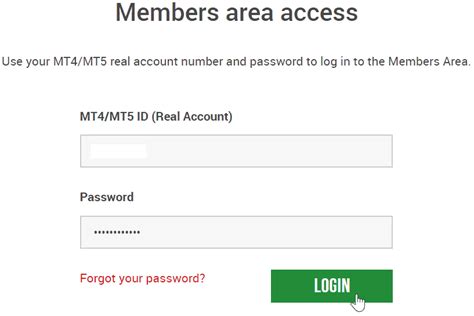
Education and Resources for New Users
New users can master the XM (xm.com) login process by exploring tutorials, webinars, and other educational resources. These materials ensure secure account management and effective use of trading platforms like MT4, MT5, and WebTrader.
1. Login Tutorials for Beginners
Step-by-step tutorials help beginners access their XM accounts securely and efficiently:
Step 1: Locate the login page on the XM website or mobile app.
Step 2: Enter your registered email address and password.
Step 3: Enable Two-Factor Authentication (2FA) for added security.
Step 4: Navigate to the dashboard to access trading tools and settings.
Tips for success:
Bookmark the XM login page for quick access.
Regularly update your password to enhance security.
2. XM Account Management Webinars
XM offers live and recorded webinars to educate users on account security, trading platforms, and funding processes.
Topics Covered in Webinars:
How to set up and log in to MT4 and MT5.
Secure methods for managing deposits and withdrawals.
Understanding trading indicators and charts.
Table: Example Webinar Schedule
| Webinar Topic | Date | Duration | Audience Level | Registration Link |
|---|---|---|---|---|
| Intro to XM Account Security | January 15, 2024 | 1 hour | Beginner | Register Here |
| Using MT4 for Forex Trading | January 22, 2024 | 2 hours | Intermediate | Register Here |
| Efficient Fund Transfers | January 29, 2024 | 1.5 hours | All Levels | Register Here |
3. Troubleshooting Guides
XM provides comprehensive guides to help users resolve common login issues. These guides include:
Password Reset Process:
Visit the XM login page.
Click "Forgot Password."
Follow the email link to create a new password.
Account Verification Delays:
Ensure all documents meet XM’s verification requirements.
Contact support if delays persist.
Platform Compatibility:
Ensure the XM mobile app or WebTrader is updated.
Check browser settings for WebTrader compatibility.
4. Training on XM Security Features
XM prioritizes user security through features like Two-Factor Authentication (2FA) and login activity monitoring. Training sessions cover:
Setting up 2FA for your account.
Recognizing suspicious login attempts.
Steps to lock your account temporarily if compromised.
Quick Tips:
Regularly check login activity in your account settings.
Never share your password or 2FA codes with anyone.
By leveraging XM's educational resources, users can confidently manage their accounts and enhance their trading experience. Tutorials, webinars, and security training ensure a secure, seamless journey for beginners and experienced traders alike. Explore these resources today to make the most of XM’s offerings!
Login Security and Financial Transactions
Secure login to XM (xm.com) ensures seamless trading and protects financial transactions like deposits and withdrawals. Learn how robust security practices safeguard your funds and optimize payment workflows.
1. Secure Login and Fund Transfers
Step-by-step guide to ensure safety during financial activities:
Before Login:
Use a secure device free from malware.
Connect to a trusted network, avoiding public Wi-Fi for sensitive activities.
Logging In:
Verify the XM website URL is authentic (https://www.xm.com).
Use two-factor authentication (2FA) for added security.
During Transactions:
Double-check deposit/withdrawal amounts.
Only use payment methods linked to your verified XM account.
Post-Transaction Monitoring:
Regularly review transaction logs in your XM account settings.
Report unauthorized activities immediately through XM’s live chat or phone support.
2. Monitoring Login Activity for Fraud Prevention
Regular activity monitoring is essential to protect your account. XM’s user-friendly dashboard allows traders to track login attempts and locations. Review these metrics to spot unauthorized access and take swift action.
Key monitoring features available in XM accounts:
| Feature | Description | Benefit | How to Use |
|---|---|---|---|
| Login Logs | View IP addresses, timestamps, and devices. | Identify unusual login patterns. | Access via Account Settings. |
| Login Alerts | Notifications for failed login attempts. | Detect potential unauthorized access. | Set up under Security Settings. |
| Session Management | End active sessions remotely. | Protect your account from active threats. | Use in Account Tools. |
| Password Update History | Review past changes to passwords. | Ensure no unexpected resets occurred. | Find in Account History tab. |
3. Integrating Payment Platforms with XM Accounts
XM provides flexibility for funding and withdrawing through multiple secure payment methods, such as bank transfers, e-wallets, and credit cards.
Steps for integration:
Log in to XM and navigate to the "Funding" section.
Choose your preferred payment platform (PayPal, Skrill, or local bank options).
Verify your account for the selected method.
Test integration with a small deposit before trading actively.
Each payment method is secured using SSL encryption, ensuring your data is protected during all transactions.
By following secure login protocols and monitoring account activity, XM users can ensure that their financial transactions are protected. With integration options and robust security features, XM empowers traders to manage funds with confidence.
Conclusion
Accessing your XM (xm.com) account securely and efficiently is essential for a smooth trading experience. From the initial login process to maintaining robust security, navigating trading platforms, and resolving issues with customer support, every aspect contributes to a seamless and productive trading journey. This guide emphasizes the interconnected elements of account management, platform usability, and security, ensuring you’re fully equipped to manage your XM account. Whether you’re a beginner or an experienced trader, understanding these components will empower you to make the most of XM's robust tools and resources.
To log in, visit the official XM website or use the mobile app. Enter your registered email address and password on the login page. If you experience issues, ensure your credentials are correct or reset your password via the "Forgot Password" option.
Always choose a strong and secure password to protect your account.
Go to the XM login page and click "Forgot Password."
Enter your registered email address.
Follow the instructions sent to your email to reset your password.
Yes, XM supports mobile login through its dedicated app for iOS and Android. The app provides secure and fast access to your account, enabling you to trade and manage your portfolio conveniently on the go.
Use a strong, unique password.
Enable two-factor authentication (2FA) for added protection.
Avoid sharing your login details with anyone.
Ensure you’re accessing XM through its official website or app.
Yes, you can log in to both MT4 and MT5 platforms using your XM account credentials. Ensure you have downloaded the correct platform version from the XM website for seamless access.
If you’re having trouble logging in, consider the following:
Verify your login credentials are correct.
Reset your password if needed.
Check for any account verification requirements.
Contact XM’s customer support via live chat, email, or phone for assistance.
Yes, login security directly impacts the safety of your financial transactions. Features like 2FA and encrypted connections ensure that deposits, withdrawals, and other payment activities remain secure.
XM offers multiple support channels:
Choose the support channel that best fits your needs for quick resolutions.
Live Chat: Available 24/5 for real-time assistance.
Help Center: Detailed FAQs and troubleshooting guides.
Email or Phone Support: Reach out for personalized help.

