




Table of contents
Part 1 - What is MQL4 and Why Use iCustom Indicators?
Part 2 - How to Integrate iCustom Indicators in MQL4?
Part 3 - How to Build an EA with iCustom Indicators?
Part 4 - What are the Best Strategies for iCustom and MQL4?
Part 5 - How to Test and Optimize Your iCustom EA?
Part 6 - Where is iCustom Used in Real-World Trading?
Part 7 - What is the Future of MQL4 and iCustom in Forex Automation?
In the wild world of Forex trading, speed and precision are the name of the game. That's where the MQL4 iCustom Indicator EA comes in—an absolute game-changer for traders looking to automate strategies and react faster than humanly possible. Imagine having a tireless assistant that watches the charts 24/7, executing trades with surgical precision based on custom indicators you design. That's the power of iCustom, a function in MQL4 that lets you bring your unique trading ideas to life.
As the legendary Warren Buffett once said, “Risk comes from not knowing what you’re doing.” Mastering iCustom takes that guesswork out, putting you in the driver's seat with strategies tailored to real market movements. This isn't just automation; it’s automation with your fingerprints on it.
In this guide, you'll learn how to build, optimize, and deploy your very own iCustom-based EA. From integrating custom indicators to running powerful backtests, we’ve got you covered step by step. Ready to take your trading game to the next level? Let's dive in.
1.What is MQL4 and Why Use iCustom Indicators?
MQL4 is a powerful programming language for creating automated trading strategies in MetaTrader 4. Let's dive into its fundamentals and understand how iCustom enhances Forex trading.
Understanding MQL4 Programming Basics
MQL4 is the backbone of automation in MetaTrader 4, enabling traders to create Expert Advisors (EAs), custom indicators, and trading scripts. The language is easy to learn for beginners and powerful enough for seasoned developers.
Core Components:
Variables: Store data like price and volume.
Functions: Execute commands, manage orders, and analyze market data.
Scripts & EAs: Automate trading without manual intervention.
Programming Logic:
MQL4 uses familiar logic structures such as loops, conditional statements, and event-handling. This makes coding efficient and adaptable to different trading strategies.
Benefits of iCustom in Forex Trading
The iCustom function in MQL4 allows traders to access custom indicators directly within their EAs, boosting the precision and scope of trading strategies. With iCustom, traders can integrate signals from advanced indicators without manual coding.
Key Advantages:
Chart Integration: Smoothly displays custom indicators on live charts.
Signal Accuracy: Retrieves exact values for enhanced decision-making.
Currency Pair Adaptability: Works seamlessly across various currency pairs.
"iCustom enables seamless communication between custom indicators and Expert Advisors, unlocking powerful algorithmic trading potential." — MetaQuotes Documentation
Core Concepts of Custom Indicators
Custom indicators in MQL4 are essential for creating unique trading signals that reflect specific strategies. Unlike standard indicators, custom indicators are fully customizable in terms of logic and visualization.
| Concept | Description | Example |
|---|---|---|
| Data Buffers | Store values for indicator plotting | Price history, RSI levels |
| Visualization | Custom graphics and chart markers | Arrows, lines, color zones |
| Indicator Logic | Defines calculation of signals | Crossovers, divergences |
Indicator Development:
MQL4 allows for intricate customizations—whether it's adding moving averages to a MACD or plotting trend lines directly onto price charts.
2.How to Integrate iCustom Indicators in MQL4?
Integrating iCustom indicators into MQL4 can feel tricky, but with the right approach, it becomes a breeze.
iCustom Function Setup Guide
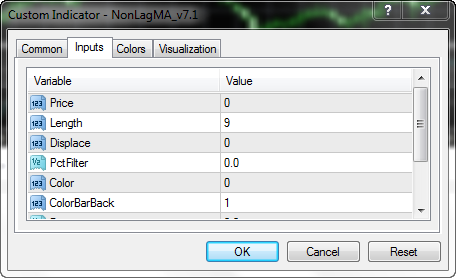
Setting up the iCustom function in MQL4 is essential for creating dynamic Expert Advisors (EAs). iCustom allows you to use custom indicators directly within your trading algorithms. Let’s break it down:
Function Configuration:
Define the indicator path:
iCustom(Symbol(), Timeframe, "IndicatorName", Parameters...)Use the correct symbol and timeframe.
Set parameters to match your custom indicator configuration.
Parameter Settings:
Ensure parameter consistency with the custom indicator.
Use double and int data types for numeric values.
Common error: Mismatched parameters leading to faulty signals.
Tips for Smooth Setup:
Always test the function before full implementation.
Use simple test scripts to verify data retrieval.
Optimize the function by using relevant input values.
Common Parameter Types
| Parameter Type | Example | Usage |
|---|---|---|
| double | 0.123456 | Signal threshold values |
| int | 14 | Moving average period |
| string | "MyIndicator" | Indicator name specification |
Connecting iCustom with MT4 Platform
Integrating iCustom with the MetaTrader 4 (MT4) platform is crucial for EA functionality. This connection ensures your custom indicators provide real-time signals within the trading terminal.
Step-by-Step Connection Guide:
Place the custom indicator file in the Indicators folder within MQL4.
Restart the MT4 platform to detect new indicators.
Write a script or EA that calls the iCustom function.
Test the connection by running the script in the Strategy Tester.
Pro Tip: Always back up your indicator files before making any modifications.
Quote from an Industry Expert:
"Integrating iCustom into MT4 can seem daunting at first, but once you grasp the basics, it’s a powerful tool for automating trading decisions." – Alex White, Forex Automation Specialist.
Mastering the integration of iCustom indicators in MQL4 is essential for efficient EA development. By properly configuring the function and ensuring smooth MT4 connections, you can leverage custom indicators for dynamic trading strategies.
3.How to Build an EA with iCustom Indicators?
Building an EA with iCustom indicators in MQL4 requires structured planning, efficient coding, and robust error handling to ensure reliable trading automation.
Key Components of an iCustom EA
To build a reliable EA, it’s crucial to understand the essential components:
iCustom Function: The backbone that calls custom indicators.
EA Architecture: Framework that organizes the program.
MetaTrader Integration: Ensures smooth data flow between indicator and EA.
Input Parameters: Allow traders to adjust settings without editing code.
Indicator Buffers: Store calculated values from the custom indicator.
External Variables: Control EA behavior dynamically.
Indicator Handle: Links the EA to the custom indicator.
Here’s a quick look at how these elements connect:
| Component | Description | Example Usage |
|---|---|---|
| iCustom Function | Calls the indicator for data | iCustom(Symbol(),...) |
| Input Parameters | Modifiable settings for the EA | extern double LotSize |
| Indicator Buffers | Store and return calculated indicator data | Buffer[i] |
Writing Logic for Custom Indicators
The logic of your custom indicator is key to success. Start by structuring your code efficiently:
Use the OnCalculate Function: Essential for processing data in real-time.
Data Series Handling: Access and manage OHLC values accurately.
Buffer Management: Make sure indicator values are stored correctly.
Algorithm Implementation: Use MQL programming for custom signal generation.
Coding Practices: Always validate data before processing.
"Writing indicator logic is like setting up a chessboard – every move counts." - Alex Trevino, MQL4 Developer
Configuring Buy and Sell Signals
Signals dictate the trading actions of your EA. Here’s how to set them up:
Define Entry Conditions: Establish when to open a position based on signal values.
Set Exit Conditions: Clearly determine when to close a position.
Threshold Values: Adjust these to refine sensitivity.
Order Triggers: Link the signals to order functions.
For example:
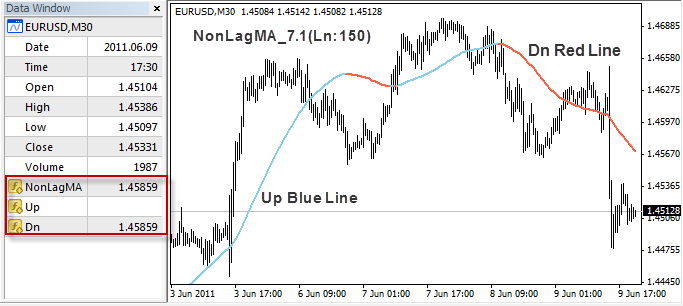
Buy Signal: When moving average crosses above the threshold.
Sell Signal: When moving average falls below the threshold.
Remember, setting signals right can be the difference between a winning and a losing strategy!
Handling Errors in EA Development
EA development can be messy – errors are inevitable. Here’s how to handle them:
Error Handling: Implement structured exception management.
EA Debugging: Use logging to track issues during runtime.
Code Validation: Test each block individually before integration.
Trade Execution Errors: Monitor for issues like "Trade Context Busy".
Robustness Checks: Regularly update your error-checking logic.
Common Error Codes and Meanings:
| Error Code | Description | Fix |
|---|---|---|
| 130 | Invalid stops | Adjust stop loss/take profit distances |
| 4051 | Invalid price | Check pricing logic and order settings |
| 4108 | Trade context busy | Wait and retry trade operation |
Building an EA with iCustom indicators is a detailed process, but mastering the core components, logic, signal configuration, and error management ensures a robust and efficient trading solution.
4.What are the Best Strategies for iCustom and MQL4?
To maximize the effectiveness of MQL4 iCustom indicators, mastering strategic integration and signal optimization is crucial. Let's explore the best approaches.
Combining Multiple Indicators Effectively
To boost your trading strategy, you need to understand how to use multiple Technical Indicators for stronger confirmations. Here are some practical tips:
Use Indicator Combination like RSI with Moving Average for trend and momentum analysis.
Employ Signal Confluence to validate trade entries, reducing false signals.
Prioritize Risk-Reward Ratios by setting precise stop-loss and take-profit points.
Always run Effectiveness Analysis through Backtesting Results before live trading.
Multi-Indicator Systems thrive in volatile markets, offering traders stronger entry and exit signals while enhancing decision-making reliability.
Optimizing Trade Signals with iCustom
Signal optimization with the iCustom Function requires a fine understanding of its parameters. Key steps include:
Adjusting Parameter Tuning for custom indicators in the MetaTrader Platform.
Buffer Mapping: Ensure that the correct Indicator Buffers are referenced for accurate signals.
Testing in the Strategy Tester to evaluate performance under various market conditions.
Linking with Expert Advisors (EAs): This allows full Automated Trading Systems to execute optimized signals without manual intervention.
When executed properly, iCustom-based optimization can turn standard strategies into powerful trading algorithms.
5.How to Test and Optimize Your iCustom EA?
Testing and optimizing your iCustom EA ensures consistent performance in live markets. This chapter dives into key techniques for evaluation, robustness, and troubleshooting.
Backtesting Techniques for EA Performance
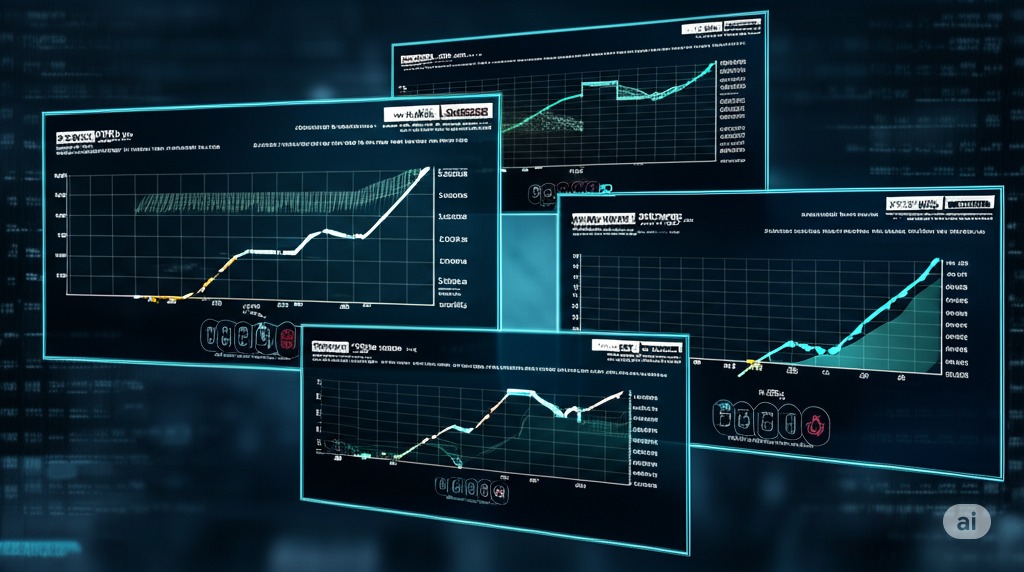
Backtesting is a crucial step in validating your EA's strategy before live trading. It involves running your Expert Advisor (EA) on Historical Data to evaluate its Strategy Parameters and Performance Metrics. This process helps detect Overfitting and assess realistic returns.
Key Techniques:
Walk-Forward Optimization: Evaluates stability across time segments.
Equity Curve Analysis: Tracks growth and identifies anomalies.
Drawdown Analysis: Measures the extent of losses during trade cycles.
| Metric | Description | Typical Range |
|---|---|---|
| Maximum Drawdown | Largest peak-to-valley loss | 10% - 30% |
| Profit Factor | Ratio of gross profit to loss | 1.5 to 2.5 |
| Recovery Factor | Net profit / Max Drawdown | Greater than 1.5 |
Backtesting lets you uncover weaknesses and optimize your EA for more consistent performance.
Evaluating Strategy Robustness
To be successful, your EA must be robust under various market conditions. Evaluating Robustness involves Stress Tests and Sensitivity Analysis to understand how strategy changes impact results. Monte Carlo Methods are particularly useful for exploring randomness in trade outcomes.
Out-of-Sample Validation – Test on fresh data to avoid Curve-Fitting Bias.
Parameter Tuning – Adjust Strategy Parameters for optimal performance.
Regime Shift Analysis – Analyze how the EA behaves during market volatility.
"A strategy that works only in perfect conditions is doomed to fail in real-world markets." — John Carter, Trading Expert
Debugging and Troubleshooting Common Issues
Even the best strategies require effective Debugging and Troubleshooting. Identifying Code Defects and Logical Errors early prevents major trading mishaps.
Common Issues to Watch For:
Execution Issues: EA fails to trigger trades as expected.
Platform Compatibility: Errors in MetaTrader 4 due to outdated builds.
System Bugs: Unexpected behavior during volatile markets.
Quick Tips:
Check Log Files for error descriptions.
Use Print Statements to trace code execution.
Apply Root Cause Analysis to isolate issues.
Debugging is your final safeguard before deploying your EA live, ensuring it runs smoothly and consistently.
6.Where is iCustom Used in Real-World Trading?
Real-World Applications of iCustom
When traders hear about automated trading systems and expert advisors (EAs), the concept often sounds like something reserved for financial wizards or tech experts. Yet, iCustom integration has taken root in the practical, day-to-day trading strategies of retail and institutional traders alike. You may wonder, why is this method so popular in the real world? The answer lies in how these custom indicators, when properly configured, can revolutionize trading signal generation and live market execution.
The Heart of Automated Trading: Custom Indicators
Let me introduce you to John, a veteran Forex trader based in New York. John started his trading journey manually, relying on standard indicators on the MetaTrader 4 (MT4) platform. As his strategy grew more sophisticated, he found that conventional indicators fell short of his specific needs. That is when he discovered the power of developing trading robots using iCustom.
John’s most significant breakthrough came when he developed a proprietary indicator designed to detect subtle shifts in market momentum. By integrating this indicator within his EA through iCustom, he transformed his manual strategy into a robust automated trading system. “Once I saw how efficiently the EA could execute trades based on my custom signals, I never looked back,” he remarked in an interview. This real-world application showcases how custom indicator integration in EAs can provide traders with a competitive edge.
Algorithmic Trading Strategies with iCustom
In professional trading environments, algorithmic trading strategies often rely on custom indicators to enhance accuracy. A prominent example is the use of iCustom-based strategies in hedge funds, where algorithmic trading must adapt to changing market conditions. Custom indicators feed data into complex algorithms, which allows for more dynamic responses compared to static strategies.
Imagine a scenario where volatility surges during major economic announcements. Traders using iCustom can deploy algorithms designed to interpret rapid price changes, thus minimizing losses or capitalizing on short-term trends. As one expert put it, “Automated trading systems that incorporate proprietary indicators through iCustom often outperform those relying on standard signals.” This insight highlights how integrating unique strategies within an EA framework can significantly optimize performance.
The Real Challenge: Strategy Backtesting and Live Market Execution
While creating an EA with custom indicators can be exhilarating, seasoned traders know that testing is where the real work begins. iCustom allows developers to simulate live market conditions within strategy backtesting environments, providing a glimpse into how the EA would perform in real time. Backtesting is not just a checkbox exercise. It is an essential process to ensure that the automated strategy performs well under various market conditions.
Take Maria, an algorithmic trader who recently published her findings on backtesting iCustom-based EAs. In her analysis, she highlighted that while the backtest results were promising, the real proof came during live market execution. Her EA, built around a custom trend-following indicator, maintained consistency even during volatile trading sessions. Maria’s experience underscores the importance of real-world testing before deploying any automated strategy.
The Reality Check: Success and Setbacks
Not every attempt at integrating custom indicators into EAs yields successful results. Traders often find that while iCustom offers incredible flexibility, poor configuration can lead to misleading signals. Some users report that their EAs overfit the data, resulting in erratic behavior during unexpected market shifts. This reality check is vital: having a robust strategy is one thing; implementing it correctly in real-world scenarios is another.
Experienced developers recommend combining technical analysis with fundamental insights. This hybrid approach helps reduce the likelihood of mechanical errors during automated trading. As one trading strategist noted, “Successful integration of iCustom into EAs requires not just technical expertise but also a deep understanding of market psychology.”
The Practicality of iCustom Integration
The power of iCustom lies not just in its flexibility but in its ability to turn personal trading insights into executable strategies. From professional algorithmic traders to retail investors seeking an edge, the practical applications of iCustom continue to grow. Whether used for refining signal generation or enhancing live market execution, this tool has become an integral part of modern Forex trading.
As traders continue to innovate and adapt, the use of custom indicators within EAs will undoubtedly expand. iCustom is not merely a tool; it is a bridge between trading ideas and real-world implementation.
7.What is the Future of MQL4 and iCustom in Forex Automation?
The future of MQL4 and iCustom in Forex automation is filled with innovation and evolving technologies that reshape trading strategies and market approaches.

Emerging Technologies in Algorithmic Trading
Algorithmic trading is rapidly evolving with technologies like machine learning, blockchain technology, and big data analytics. These innovations are empowering high-frequency trading and predictive analytics for more accurate and faster decision-making.
Fintech innovation is driving real-time trading efficiency.
Robo-advisors are optimizing portfolio management through automated processes.
Quantitative models leverage big data to enhance predictive capabilities.
"The integration of machine learning into algorithmic trading will redefine market prediction accuracy." — Dr. Adam Feller, Quantitative Analyst
Future of EA Development with MQL4
The development of Expert Advisors (EAs) in MQL4 is set to become more advanced as MetaTrader 4 remains popular in the Forex community. Key improvements are anticipated in:
Code optimization for faster execution and stability.
Enhanced strategy backtesting to reduce risk.
More custom indicators for precise market analysis.
With the growth of MQL5, developers are bridging the gap between classic and modern EA functionalities.
Integrating AI with iCustom Logic
Combining Artificial Intelligence (AI) with iCustom function in MQL is transforming custom trading indicators into powerful prediction tools. The use of neural networks and machine learning algorithms enables more adaptive and data-driven strategies.
Predictive modeling enhances forex signals.
Data-driven trading adjusts strategies dynamically.
AI boosts MetaTrader performance with real-time analytics.
This evolution allows for self-learning EAs that improve over time, mimicking human decision-making but with machine speed.
Global Trends in Forex Automation
Forex automation is shifting towards more algorithmic trading and AI integration. Key trends include:
| Trend | Description | Impact on Forex |
|---|---|---|
| Trading Robots | Automated execution of trades | Increases speed and consistency |
| AI in Forex | Machine learning for better forecasting | More accurate market predictions |
| Regulatory Changes | Global financial oversight adjustments | Greater transparency and compliance |
Fintech solutions are also pushing boundaries, making global currency trading more seamless with advanced market analysis tools.
Conclusion
Mastering MQL4 and iCustom isn't just about coding—it's about taking charge of your trading destiny. With the right custom indicators, your EA can spot opportunities faster than a seasoned trader with decades of experience. As Warren Buffett says, “Risk comes from not knowing what you’re doing.” Now you know.
The tools are in your hands; it’s time to build, test, and optimize. Don't just watch the market—make it work for you.
iCustom is a function in MQL4 that allows Expert Advisors (EAs) to call and use custom indicators. This is particularly useful for integrating unique trading strategies that are not covered by standard indicators in MetaTrader 4.
Allowing for more customizable analysis of market trends
Enabling automated decision-making based on unique trading algorithms
Increasing the precision of entry and exit points through real-time calculations
Yes, you can integrate multiple iCustom indicators into a single EA. Many traders use combinations of indicators like RSI, MACD, and custom trend detectors to improve strategy robustness.
Validate your trading strategy against historical data
Identify potential issues before live trading
Optimize parameters for better performance
The main difference lies in customization. Standard MQL4 indicators are predefined, while iCustom allows you to integrate personalized logic and calculations, offering greater flexibility and control over your trading strategy.
Optimizing your iCustom EA ensures that it performs efficiently under various market conditions. It helps in minimizing drawdowns and improving profit margins by fine-tuning parameters.

